UnderlayX AI Review: Is This Free AI Image Editor Worth Your Time?
If you love creating stunning visuals but dread the hassle of complicated editing tools, you are in for a treat today. I am diving into UnderlayX AI, a free AI powered image editor that promises to make your creative life easier.
Imagine adding text behind objects, removing backgrounds in a snap, or creating glowing effects without breaking a sweat. Sounds exciting, right? In this blog post, I will walk you through everything you need to know about UnderlayX AI.
From its features to its pros and cons, I have got you covered. Stick around because this tool might just become your new best friend for editing images!

Key Takeaways:
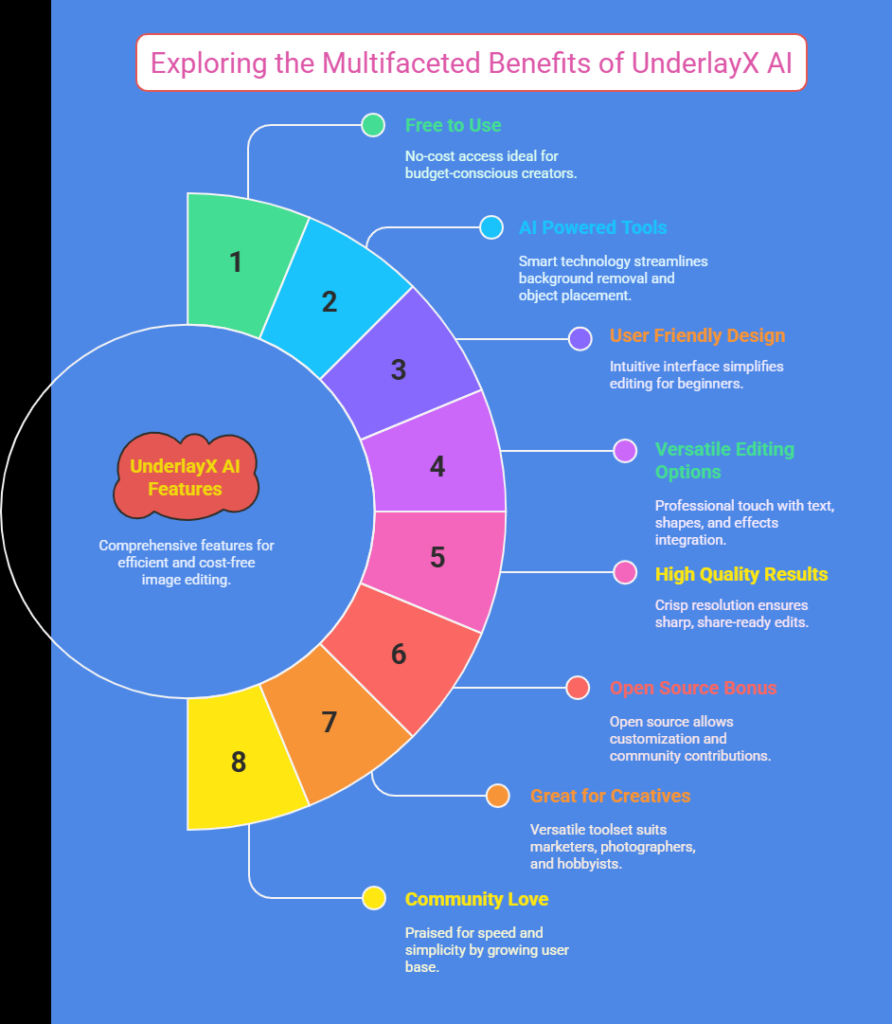
Here is a quick rundown of what I discovered about UnderlayX AI. This section sums up the big points so you can see the value right away.
- Free to Use: UnderlayX AI offers its core features at no cost. You can edit images without spending a dime, which is perfect for budget conscious creators.
- AI Powered Tools: The platform uses smart technology to handle tasks like background removal and object placement. It saves you time and effort.
- User Friendly Design: The interface is simple and clear. Even beginners can start editing without feeling lost.
- Versatile Editing Options: You can add text, shapes, and effects behind objects. It gives your images a professional touch.
- High Quality Results: Downloads come in crisp resolution. Your edits look sharp and ready to share.
- Open Source Bonus: The creator made UnderlayX AI open source. Tech savvy folks can tweak it or contribute to its growth.
- Great for Creatives: Marketers, photographers, and hobbyists find it useful. It fits many needs with ease.
- Community Love: Users on Reddit and Product Hunt praise its speed and simplicity. It has a growing fan base.
This list gives you a solid starting point. Now, let’s dig deeper into each aspect of UnderlayX AI to see how it performs in real life.
What Is UnderlayX AI?
UnderlayX AI is a free online tool for editing images. It uses artificial intelligence to make tasks fast and easy. You can upload a photo and start playing with features like background removal or text overlay in minutes.
The tool launched in late 2024 and quickly gained attention. Its creator, Vineer, shared it on Product Hunt, where it earned praise for being a one stop shop for image edits.
I like how UnderlayX AI focuses on simplicity. You do not need to be a pro to use it. The platform lets you place text or shapes behind objects in your images, which is a cool trick for making visuals pop.
It also offers glowing effects and cloning tools. These features help you create standout designs without much effort. Plus, it is web based, so no downloads are needed. You just visit the site and get started.
Who Created UnderlayX AI?
Vineer is the brain behind UnderlayX AI. He is a developer with a passion for creative tools. I found out he first built it as a personal project to solve his own editing needs. After sharing it with friends, word spread fast.
In January 2026, he posted about it on Reddit’s SideProject community. The response was huge, with over 350 users trying it in just 48 hours. That buzz pushed him to make it open source on GitHub.
Vineer’s story is inspiring. He turned a side hustle into something thousands now use. His focus was on combining multiple editing features into one tool. I think that vision shines through in UnderlayX AI’s design. It feels practical and user driven, which makes it fun to explore.
How Does UnderlayX AI Work?
UnderlayX AI runs on a straightforward process. You visit the website at underlayx.com and upload your image. The AI kicks in to analyze it. Want to remove a background?
Click the option, and it is gone in seconds. Need text behind an object? Select the tool, type your words, and adjust the placement. The interface guides you step by step.
I tested it with a photo of my dog. The AI quickly separated her from the messy yard background. Then, I added a glowing “Best Pup” label behind her. It took me less than five minutes.
The smart blending feature matched the lighting perfectly. You can tweak things like opacity or shadows too. Once happy, you download the high quality result. It is that simple!
Top Features of UnderlayX AI
UnderlayX AI packs a bunch of handy features. Here are the ones that stood out to me during my trial.
First, background removal is lightning fast. The AI spots objects and clears the rest with precision. Second, text and shape overlay lets you add elements behind your subject. It creates depth in your images. Third, glowing effects add a fun, eye catching vibe. You can adjust the intensity to suit your style.
There is also object cloning, which copies parts of your image seamlessly. I cloned a flower in my test photo, and it looked natural.
The smart blending algorithm adjusts colors and shadows for a polished finish. Finally, the high resolution output ensures your work looks pro level. These tools make UnderlayX AI a powerhouse for quick edits.
Is UnderlayX AI Really Free?
Yes, UnderlayX AI is free to use! I was skeptical at first, but there are no hidden fees for the main features. You can upload, edit, and download images without paying anything. Some tools online tease you with free trials then charge later. Not this one. Vineer built it to be accessible, and it delivers on that promise.
That said, I noticed a few premium vibes. The quality and speed feel like something you would pay for. Since it is open source, future updates might add paid options. For now, though, you get a lot without spending a cent. It is a win for anyone starting out or keeping costs low.
Who Can Benefit from UnderlayX AI?
UnderlayX AI suits a wide range of people. Content creators love it for social media graphics. I made a quick Instagram post, and it looked sleek. Marketers use it to spruce up product photos. The background removal is perfect for clean promo shots.
Photographers find it handy too. It tweaks images without needing heavy software. Hobbyists enjoy playing with effects for fun projects. Even small business owners can create ads on a budget. The tool’s versatility makes it a fit for anyone who wants easy, quality edits.
Pros of Using UnderlayX AI
UnderlayX AI has plenty of upsides. Ease of use tops the list. The layout is clean, and tools are simple to find. Speed is another big win. Edits that take ages in other programs finish fast here. Free access saves money, which I always appreciate.
The AI accuracy impressed me too. It handles tricky cuts like hair or fur well. Creative options like glowing effects spark ideas. Plus, the community support on places like Reddit adds value. Users share tips and tricks, making it a team effort. For a free tool, it punches above its weight.
Cons of UnderlayX AI
No tool is perfect, and UnderlayX AI has some downsides. Limited advanced features stood out to me. If you need deep edits like layer masking, you might feel stuck. Web only access means you need internet. No offline mode exists yet.
I also found minor bugs. Once, the glow effect flickered before saving right. It is not a dealbreaker, but it happens. Learning curve for newbies might trip up total beginners. The basics are easy, but mastering all tools takes practice. Still, these are small gripes for a free platform.
How Does UnderlayX AI Compare to Other Tools?
I pitted UnderlayX AI against tools like Canva and Photopea. Canva is great for templates but lacks AI depth. UnderlayX AI wins on smart edits like background removal. Photopea mimics Photoshop and offers more control. However, it is tougher to learn and not fully free.
UnderlayX AI sits in a sweet spot. It blends AI power with simplicity. Tools like Synthflow AI focus on other niches, like sales. UnderlayX AI stays laser focused on image editing. For quick, creative tasks, it holds its own against the big names.
User Feedback on UnderlayX AI
People online love UnderlayX AI. On Reddit, one user said it cut their editing time in half. Another praised the open source move, calling it “a gift to creators.” Product Hunt reviews echo this. Users rate its ease and output quality highly.
I saw some gripes too. A few mentioned wanting desktop versions. Others noted occasional slowdowns on big files. Overall, the vibe is positive. The community vibe shines through, with users swapping edits and ideas. It feels like a tool people root for.
Why UnderlayX AI Stands Out
UnderlayX AI grabs attention for a few reasons. Its behind object tech is a game changer. Adding text or shapes there adds flair other tools miss. The free and open source combo sets it apart too. You rarely get both in one package.
I think its focus on speed seals the deal. Busy folks need fast results, and it delivers. Vineer’s personal touch shows in the design. It feels made by someone who gets the struggle of editing. That user first approach makes it special.
Tips for Getting Started with UnderlayX AI
Ready to try UnderlayX AI? Here are some pointers. Start with a simple photo to test the waters. Use the background removal first—it is a crowd pleaser. Play with text placement next. Adjust sizes and colors for fun.
Save often to avoid glitches. Check out Reddit for user hacks. The community shares cool ideas. Do not overload big files at first. Stick to smaller ones while you learn. Have fun experimenting—mistakes teach you the most!
Future of UnderlayX AI
What is next for UnderlayX AI? Since it is open source, growth looks bright. Users might add features like video edits or mobile apps. Vineer hinted at updates on social media, but nothing firm yet. I bet the community will shape it.
I hope for offline access soon. More effects would rock too. The buzz suggests it will keep evolving. With 7.1K monthly visits already, per Toolify, it has momentum. Watch this space—it could get even better!
My Final Thoughts on UnderlayX AI
After testing UnderlayX AI, I am sold. It is a free, fun tool that delivers real value. The AI makes tough edits simple, and the results look sharp. Sure, it has limits, but for quick creative work, it is a gem. I love how it balances power and ease.
If you want a no cost way to boost your images, give it a shot. It is perfect for casual users and pros on a budget. UnderlayX AI feels like a friend in your editing toolkit. Try it out and see what you can create!
FAQs
What Is UnderlayX AI Used For?
UnderlayX AI edits images with AI tools. You can remove backgrounds, add text behind objects, and create effects. It helps creators make visuals fast.
Is UnderlayX AI Free?
Yes, UnderlayX AI is free. You use all main features without paying. It is great for saving money.
Can Beginners Use UnderlayX AI?
Beginners can use UnderlayX AI. The design is simple. You might need practice to master it, but it is easy to start.
Does UnderlayX AI Work Offline?
No, UnderlayX AI needs internet. It is web based only. You cannot edit without a connection.
How Do I Download My Edited Images?
You download edited images from UnderlayX AI easily. Finish your edits, click save, and get a high quality file.

I’m Liza, the founder and author of Liza AI Blog, where I share my passion for artificial intelligence through insightful guides and updates. I’m dedicated to making AI accessible to everyone, and I strive to create a community that’s both informed and engaged. Through my blog, I aim to promote a deeper understanding and appreciation of AI and its potential to shape our future. You can reach me at lizaaiblog@gmail.com or follow me on social media to stay updated on the latest AI news and trends.