How to Use Tess AI: Your Friendly Guide to Mastering This Powerful Tool
Are you ready to dive into something exciting? Imagine having a super smart assistant that can help you with almost anything. That’s what Tess AI offers! Created by the folks at Pareto, Tess AI is an all in one platform that brings artificial intelligence right to your fingertips.
Whether you want to create content, analyze data, or automate tasks, Tess AI has your back. This blog post walks you through everything you need to know about using Tess AI.
From getting started to exploring its coolest features, I’ve got you covered with simple steps and friendly tips. Stick around, because by the end, you’ll feel like a Tess AI pro!
Key Takeaways:
Here’s a quick rundown of what you’ll learn in this post. Think of it as your cheat sheet to mastering Tess AI!
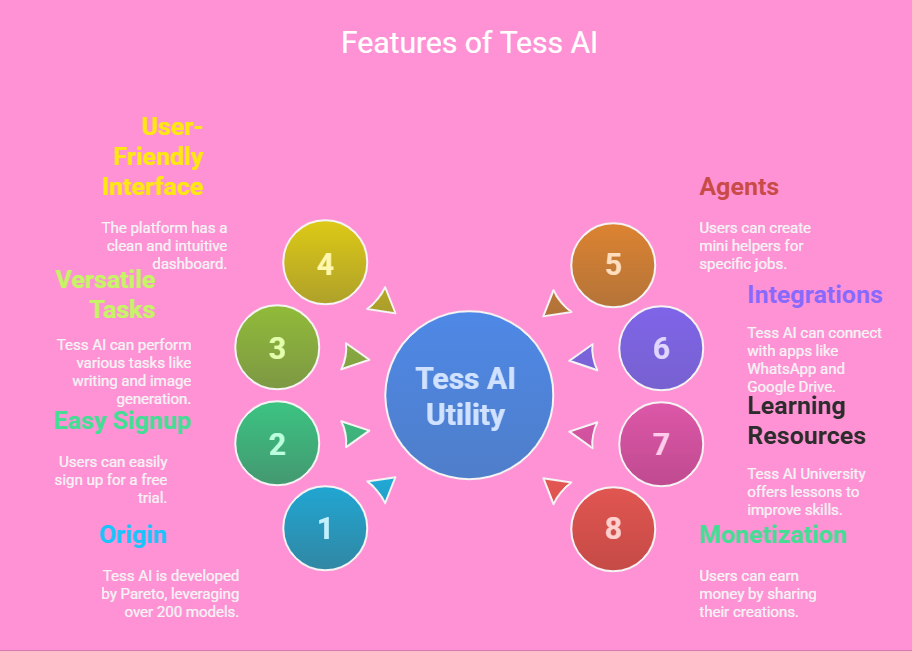
- Tess AI comes from Pareto. It’s an AI platform that combines over 200 models to help you work smarter.
- You can sign up easily. A free trial lets you test it out for seven days without any hassle.
- It handles many tasks. Use it to write blogs, generate images, or even crunch numbers.
- The interface is simple. You’ll find it user friendly with a clean dashboard to get started fast.
- Agents make it powerful. These are like mini helpers you can create for specific jobs.
- It integrates with other tools. Connect Tess AI to apps like WhatsApp or Google Drive for extra convenience.
- Learning is built in. Tess AI University offers lessons to help you get better at using it.
- You can earn money. Share your creations in the AI Market and turn your skills into cash.
This list gives you the big picture. Now, let’s dig into the details and see how each part works!
What Is Tess AI?
Tess AI is a platform built by Pareto. It mixes tons of AI models into one handy tool. You get access to over 200 different AI systems, like ChatGPT, Gemini, and Claude. These models team up to help you do all kinds of things.
Want to write a blog post? Tess AI can do that. Need a cool image for your project? It’s got you covered. It even handles math or data tasks if you ask it to.
The best part? You don’t need to know coding. Tess AI keeps everything simple. You just tell it what you want, and it figures out the rest. People use it for work, school, or even fun projects.
It’s like having a super smart friend who’s always ready to help. Plus, it’s secure. Your data stays safe while you play around with all its features.
Why Use Tess AI?
You might wonder why Tess AI stands out. Well, it saves you time. Instead of juggling multiple tools, you get everything in one place. Writing, designing, and analyzing become faster. It also cuts costs. Subscribing to lots of separate AI services adds up. Tess AI bundles them together for less.
Another reason is flexibility. You can use it for small tasks or big projects. It works for beginners and pros alike. The platform grows with you too. As you learn more, Tess AI offers advanced options to explore.
Plus, it’s fun! Experimenting with AI feels like magic sometimes. Whether you’re a student, a business owner, or just curious, Tess AI fits your needs.
How to Sign Up for Tess AI
Getting started with Tess AI is super easy. First, go to the Tess AI website. Look for the “Try for Free” button. Click it, and you’ll see a sign up page. Enter your email and create a password.
That’s it! You don’t need to give credit card details for the free trial. It lasts seven days, so you’ve got plenty of time to test it out.
After signing up, check your email. You’ll get a confirmation link. Click that, and you’re in. The site takes you to your dashboard right away. It’s clean and simple, with options to start exploring.
If you like it, you can pick a paid plan later. Plans vary based on how much you want to use it, but the trial gives you a solid taste of what’s possible.
Understanding the Tess AI Dashboard
The dashboard is your home base in Tess AI. It looks neat and welcoming. You’ll see a menu on the left with options like “Chat,” “Agents,” and “Market.” The main area shows your recent projects or a blank slate to start fresh. At the top, there’s a search bar to find stuff fast.
Everything is labeled clearly. You won’t feel lost. Want to talk to an AI? Click “Chat.” Want to build something custom? Hit “Agents.” It’s all right there.
The dashboard also shows your account details, like how many credits you’ve got left in the trial. Take a few minutes to click around. You’ll get the hang of it in no time.
How to Use the Chat Feature
The chat feature is where the fun begins. Click “Chat” on the dashboard. A window pops up, ready for your questions. You can ask anything. Try something like, “Write a short story about a cat.” Tess AI will type back a reply fast. It pulls from models like OpenAI or Gemini to give you smart answers.
You can switch between models too. Just pick one from a dropdown menu. Each model has its own style. Some are chatty, others are straight to the point.
You can also upload files, like a PDF, and ask Tess AI to read it. It’s great for summarizing stuff or getting quick insights. Play with it and see what you can make it do!
Creating Your First AI Agent
Agents are like little helpers you build yourself. Go to the “Agents” section on the dashboard. Click “Create Agent.” Give it a name, like “Blog Buddy.” Then, tell it what to do. You might say, “Write blog posts in a friendly tone.” Add some instructions, like keeping sentences short.
Next, pick a model to power your agent. Claude works well for writing. Hit save, and your agent is ready. Now, you can chat with it anytime. Ask it to draft a post, and it’ll follow your rules. Agents save you time by doing repetitive tasks your way. Start small, then tweak it as you go.
Generating Content with Tess AI
Need a blog post or a social media update? Tess AI makes it simple. Use the chat or an agent. Say something like, “Write a 300 word blog post about dogs.” Tess AI will whip it up in seconds. The text comes out clear and readable. You can edit it to add your own voice.
It’s not just text either. Ask for images too. Type, “Create a picture of a happy dog.” Tess AI uses tools like Leonardo AI to draw it for you. The results are unique and fun. You can use this for marketing, school projects, or just to impress your friends. It’s quick and creative!
Analyzing Data with Tess AI
Tess AI isn’t only for writing. It crunches numbers too. Upload a spreadsheet in the chat. Ask, “What’s the average of these numbers?” Tess AI will calculate it fast. It can also spot trends or summarize data. This is handy for business folks or students with homework.
Try uploading a sales report. Say, “Tell me the top selling product.” Tess AI reads it and gives you the answer. It’s like having a math whiz on speed dial. The results are accurate and easy to understand. You’ll save hours compared to doing it by hand.
Integrating Tess AI with Other Tools
Tess AI plays nice with other apps. You can connect it to WhatsApp, Google Drive, or HubSpot. Go to the “Integrations” section on the dashboard. Pick an app, like Google Drive. Follow the steps to link it. Now, Tess AI can pull files from there or save stuff back to it.
For example, link WhatsApp. Set up an agent to answer customer questions. Someone texts your number, and Tess AI replies. It’s automatic and smooth. This makes your workday easier by keeping everything connected. Experiment with integrations to see what fits your routine.
Learning with Tess AI University
Want to get better at using Tess AI? Check out Tess AI University. Find it on the dashboard under “Learn.” It’s full of lessons, from beginner to advanced. You’ll see over 60 videos and guides. They cover stuff like building agents or writing prompts.
Start with the basics. Watch a video on how chat works. Then, move to trickier topics, like data analysis. It’s free with your account, so dive in anytime. The lessons are short and clear. You’ll pick up tips to make Tess AI even more useful for you.
Sharing and Earning with the AI Market
Here’s a cool perk. You can make money with Tess AI! Go to the “Market” section. Share your agents there. If you built a great “Blog Buddy,” list it for others to use. Set a price, and people can buy access. It’s like selling your own mini app.
Browse the market too. You might find agents others made that save you time. It’s a win win. You earn cash, and others get help. The market is buzzing with ideas, so jump in and see what you can create or grab for yourself.
Tips for Getting the Most Out of Tess AI
To rock Tess AI, keep a few things in mind. First, be clear with your instructions. Say exactly what you want, like “Write a funny 200 word story.” Vague requests get messy results. Second, experiment. Try different models or tasks to find what works best.
Third, use agents for repeat jobs. They save tons of time. Fourth, watch those Tess AI University videos. They’re gold for leveling up your skills. Finally, have fun! Mess around with silly prompts or wild ideas. Tess AI is your playground, so enjoy it.
FAQs
How Do I Start Using Tess AI?
Go to the Tess AI website. Click “Try for Free.” Sign up with your email and a password. Confirm your email, and you’re ready to roll with the seven day trial.
What Can Tess AI Do?
It writes text, generates images, analyzes data, and more. You can use it for blogs, math, or even automating replies on apps like WhatsApp.
Is Tess AI Free?
You get a free seven day trial. After that, you pick a paid plan. Prices depend on how much you use it, but the trial is totally free.
Can I Make Money with Tess AI?
Yes! Create agents and sell them in the AI Market. Others buy them, and you earn cash for your work.

I’m Liza, the founder and author of Liza AI Blog, where I share my passion for artificial intelligence through insightful guides and updates. I’m dedicated to making AI accessible to everyone, and I strive to create a community that’s both informed and engaged. Through my blog, I aim to promote a deeper understanding and appreciation of AI and its potential to shape our future. You can reach me at lizaaiblog@gmail.com or follow me on social media to stay updated on the latest AI news and trends.