How to Use Phrasly AI: Your Simple Guide to Mastering This Tool
It’s an awesome tool that’s making waves in the content creation world. Imagine having a buddy that helps you turn stiff, robotic text into something that sounds like you wrote it over coffee.
That’s what Phrasly AI does! Whether you’re a student dodging AI detectors, a blogger spicing up posts, or a marketer crafting slick copy, this tool has your back.
In this guide, I’ll walk you through how to use Phrasly AI step by step. Trust me, it’s easier than you think, and by the end, you’ll wonder how you ever managed without it. Let’s dive in and see what this gem can do for you!
Key Takeaways:
Here’s a quick rundown of what you’ll learn in this post. Think of it as your cheat sheet to mastering Phrasly AI!
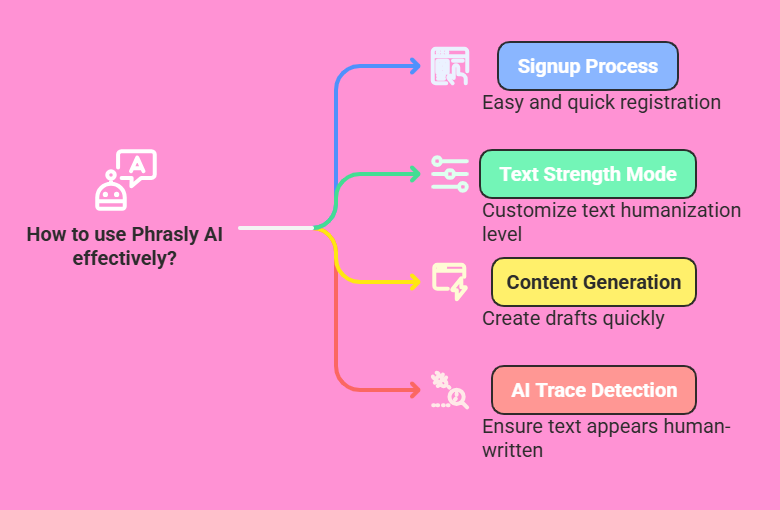
- Phrasly AI helps you humanize text. It takes AI-written stuff and makes it sound natural.
- You can sign up easily. A few clicks on their website, and you’re in.
- It offers different modes. Pick Easy, Medium, or Aggressive to change text strength.
- The tool generates content too. Need a draft? Phrasly can whip one up fast.
- It checks for AI traces. Use the detector to see if your text looks human.
- Exporting is simple. Send your work to Google Docs or Word with one click.
- Multilingual support rocks. Write in English, Spanish, or more languages.
- Pricing fits your needs. Free trials and paid plans keep it flexible.
- You’ll save time. Tasks that took hours now take minutes.
This list covers the basics, but there’s so much more to explore. I’ll break it all down in simple steps so you can start using Phrasly AI like a pro. Let’s jump into the good stuff!
What Is Phrasly AI?
Phrasly AI is a tool that transforms AI-generated text into human-like writing. It’s perfect if you use tools like ChatGPT but want your output to feel personal. Students love it for essays.
Bloggers use it for posts. Marketers tweak ads with it. The tool launched in 2023, and its team, led by Ankur Goyal, aimed to help people create content without worrying about AI detectors flagging it.
I tried it with a ChatGPT draft. The original text sounded stiff. Phrasly made it flow like I wrote it myself. It’s like having a writing buddy who knows your style! The tool uses smart algorithms to adjust sentence structure and word choice. It keeps your meaning intact but adds a human touch.
You get three modes: Easy, Medium, and Aggressive. Easy makes small tweaks. Aggressive rewrites heavily. Medium sits in between. Plus, it has a content generator and an AI detector. Over a million users trust it. That’s a big deal! It’s simple to use, and I’ll show you how in the next sections.
How Do You Sign Up for Phrasly AI?
Signing up for Phrasly AI is a breeze. You start by visiting their website. Look for the “Sign Up” button. It’s usually at the top right. Click it. You’ll need an email and a password. Fill those in. Hit submit. Done!
After that, you get a confirmation email. Open it. Click the link inside. This verifies your account. Now, log in with your details. The dashboard pops up. It’s clean and easy to use. No tech skills needed here! You can start with a free trial. It gives you 550 words to play with. Want more? Pick a paid plan later.
I signed up in under two minutes. The free trial let me test it on a short blog post. It worked like a charm. The site offers a student plan for $19.99 monthly or an unlimited one for $10.99 monthly if paid yearly. Choose what fits you. You’re ready to roll!
How Do You Humanize Text with Phrasly AI?
Humanizing text is Phrasly AI’s star feature. You take AI-generated content and make it sound natural. Here’s how it works. Log into your account. Find the “Humanize” tab. Paste your text in the box.
Next, pick a mode. Easy keeps it light. Medium balances changes. Aggressive rewrites a lot. Click “Humanize.” Wait a few seconds. The tool spits out a new version. Read it. Does it sound like you? If not, tweak it again.
I tested it with a robotic paragraph from ChatGPT. The original said, “Artificial intelligence improves efficiency.” After Medium mode, it became, “AI boosts how fast we get things done.” Way more human, right? You can edit the result too. It’s flexible. This feature saves time and keeps your work authentic.
How Do You Generate Content with Phrasly AI?
Phrasly AI isn’t just for fixing text. It creates content too. Go to the “Generate” section. Type a prompt. Something like, “Write a blog intro about travel.” Set the tone. Casual? Formal? Hit “Generate.”
The tool pumps out a draft fast. I asked for a 200-word travel piece. It gave me a fun intro about exploring new places. The words flowed nicely. You can adjust length and style. Need more? Add details to your prompt.
It’s not perfect. Sometimes, it repeats ideas. Edit the output to fit your voice. I used it for a post and cut the fluff. The result? A solid base I polished in ten minutes. It’s great for brainstorming or beating writer’s block. Try it!
How Do You Use the AI Detector in Phrasly AI?
Phrasly AI has an AI detector. It checks if text looks machine-made. Open the “Detect” tab. Paste your content. Click “Analyze.” The tool scans it. You get a score. High means AI-generated. Low means human-like.
I ran a ChatGPT essay through it. The score was 90%. Obvious AI stuff. After humanizing it with Phrasly, the score dropped to 20%. Pretty cool, huh? The detector’s 99.8% accurate, they say. It’s free to use unlimited times.
This helps you double-check work. If you’re submitting something, make sure it passes. It’s simple and quick. I love knowing my text won’t get flagged. Give it a shot!
How Do You Export Content from Phrasly AI?
Exporting from Phrasly AI is super easy. Finish your text. Look for the “Export” button. Click it. Pick a format. Options include Google Docs or Microsoft Word. Hit download. That’s it!
I humanized a blog post. Exported it to Word. Opened it on my laptop. No formatting issues! It’s ready to use or share. The tool processes up to 2500 words at once on paid plans. Free trials cap at 550.
This feature saves hassle. No copying and pasting. You get clean files fast. I sent a draft to a friend in seconds. It’s a small thing, but it makes life smoother. Try exporting your next piece!
How Do You Switch Languages in Phrasly AI?
Phrasly AI works in many languages. English, Spanish, French, German—you name it. Go to settings. Find the language menu. Click it. Choose your language. Save it.
I switched to Spanish for a test. Pasted an English paragraph. Humanized it. The result? Fluent Spanish text. It kept the meaning spot on. You can generate content in other languages too. Just set it first.
This is huge for global users. A blogger friend writes in French. She loves it. The tool adapts without losing quality. Play with it if you need multilingual content!
How Do You Pick the Right Phrasly AI Plan?
Phrasly AI has plans for everyone. The free trial starts you off. You get 550 words. After that, it’s $131.88 yearly. The Unlimited plan is $10.99 monthly, billed annually at $131.88. Students pay $19.99 monthly.
Think about your needs. Write a lot? Go Unlimited. It gives 2500 words per process. Just testing? Stick with free. I tried the trial. It was enough for a small project. Upgraded later for bigger stuff.
Check their site for updates. Prices might shift. Pick what fits your budget and workload. You can cancel anytime, but some say it’s tricky. Test it first!
How Do You Save Time with Phrasly AI?
Phrasly AI cuts hours off writing. Humanizing text takes seconds. Generating drafts? Minutes. No more staring at blank pages. I used to spend an hour tweaking AI text. Now, it’s ten minutes.
The detector saves worry. Exporting skips manual work. It’s like a turbo boost for productivity! A student friend finished an essay in half the usual time. Bloggers churn out posts faster.
You focus on ideas, not grunt work. It’s not flawless. You still edit. But the heavy lifting? Done. Try it on your next deadline. You’ll feel the difference!
How Do You Avoid Detection with Phrasly AI?
Phrasly AI shines at dodging detectors. Humanize your text well. Use Aggressive mode for strict tools like Turnitin. I tested it. A ChatGPT essay got flagged. Post-Phrasly? Clean.
The key is tweaking. Run the detector after. Score high? Humanize again. It’s a safety net! Over 99% of users bypass detection, per Phrasly. Edit slightly too. Add your flair.
This works for school or blogs. Google hates pure AI content. Phrasly keeps you safe. Practice with it. You’ll nail undetectable text fast!
How Do You Get Support with Phrasly AI?
Need help? Phrasly AI has support. Go to their site. Find “Contact.” Email them. They reply fast. I had a billing question. Got an answer in a day. Solid service!
Some users say live chat lags. Stick to email for now. The dashboard has a FAQ too. Check it first. It covers basics like modes and exporting.
Support’s there if you’re stuck. Don’t hesitate. They want you to succeed. Reach out and keep rolling with your projects!
FAQs
What Does Phrasly AI Do?
Phrasly AI turns AI-generated text into human-like writing. It helps you avoid detectors and create content fast.
How Much Does Phrasly AI Cost?
It offers a free trial with 550 words. Paid plans start at $10.99 monthly if billed yearly. Students pay $19.99 monthly.
Can Phrasly AI Write in Spanish?
Yes, it supports Spanish, French, German, and more. Switch languages in settings.
Does Phrasly AI Beat Turnitin?
It can. Use Aggressive mode and check with the detector. Most users pass undetected.
Is Phrasly AI Easy to Use?
Super easy! Sign up, paste text, pick a mode, and go. No tech skills needed.
Can I Cancel Phrasly AI Anytime?
Yes, but some find it hard. Test the trial first. Contact support if issues pop up.

I’m Liza, the founder and author of Liza AI Blog, where I share my passion for artificial intelligence through insightful guides and updates. I’m dedicated to making AI accessible to everyone, and I strive to create a community that’s both informed and engaged. Through my blog, I aim to promote a deeper understanding and appreciation of AI and its potential to shape our future. You can reach me at lizaaiblog@gmail.com or follow me on social media to stay updated on the latest AI news and trends.