How to Use Hypotenuse AI to Create Amazing Content
Welcome to the exciting world of Hypotenuse AI. This tool helps you write content fast. Imagine having a smart assistant that makes blog posts, product descriptions, and social media captions in minutes.
You save time and still get great results. Hypotenuse AI uses artificial intelligence to turn your ideas into words. It works for beginners and pros alike. Want to know how it can change your writing game?
Keep reading. This guide shows you step by step how to use Hypotenuse AI. You will learn tips, tricks, and ways to make content that grabs attention. Let’s dive in and see what this tool can do for you.

Key Takeaways:
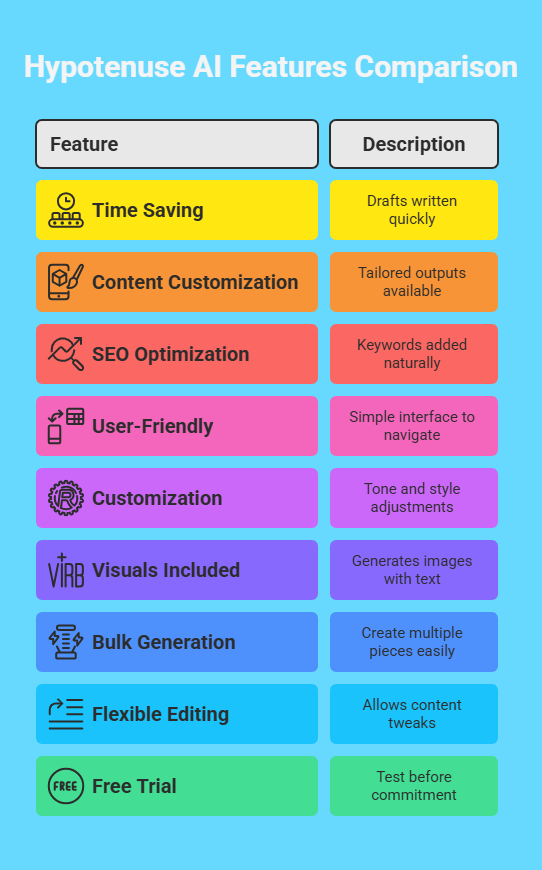
Here’s a quick list of what this blog post covers. These points sum up the big wins you get from using Hypotenuse AI.
- You save time. Hypotenuse AI writes drafts fast. You spend less time staring at a blank page.
- Content fits your needs. It creates blog posts, ads, and more. You pick what you want.
- SEO boosts your reach. The tool adds keywords naturally. Your content ranks higher on Google.
- It’s easy to use. The interface is simple. You don’t need tech skills to start.
- Customization is key. You set the tone and style. The output matches your brand.
- Images come too. Hypotenuse AI makes visuals with HypoArt. You get pictures for your posts.
- Bulk work is simple. You can generate many pieces at once. This helps big projects.
- Editing is flexible. You tweak the results. The content becomes yours.
- Free trial awaits. You test it without paying first. See if it works for you.
These takeaways show why Hypotenuse AI stands out. It blends speed, ease, and quality. Now, let’s explore how to use it.
What Is Hypotenuse AI?
Hypotenuse AI is a writing tool powered by artificial intelligence. It helps you create content quickly. You give it a topic or keywords. It then writes text for you. The tool handles many tasks. You can make blog posts, product descriptions, or email copy.
It even generates images. People use it for marketing, blogging, and e commerce. The AI learns from huge amounts of data. This makes its writing sound natural.
You don’t need to be a writer to use it. The platform is web based. You log in and start creating. It saves you hours of work. Plus, it keeps your content fresh and engaging.
Why Choose Hypotenuse AI?
You might wonder why this tool matters. Hypotenuse AI offers clear benefits. It speeds up your writing process. You finish projects faster. It also keeps quality high. The text reads like a human wrote it.
You get options to customize. This means your content fits your voice. The tool supports SEO too. It uses keywords to help your work rank better. Your audience finds you easier.
Beginners find it simple. Experts love its power. You can try it free for seven days. No credit card needed. This lets you test it risk free. It’s a smart choice for anyone who writes.
How to Sign Up for Hypotenuse AI
Signing up is easy. You start by visiting the Hypotenuse AI website. Look for the sign up button. Click it. You fill in your email and a password. That’s it for the basics. You get a free trial right away.
No payment details required yet. After signing up, you log in. The dashboard opens. It shows all the tools you can use. You pick what you want to create. The process takes minutes.
Then you’re ready to write. Check your email for a welcome message. It might have tips to start. This quick setup gets you going fast.
How to Create a Blog Post with Hypotenuse AI
Creating a blog post is fun with this tool. You start on the dashboard. Click “Blog Article.” A form pops up. You type your topic. For example, “Best Dog Food Tips.” Add a primary keyword like “dog food.”
You can add more keywords too. Pick a tone, like friendly or professional. Click “Generate Titles.” The AI suggests headlines. You choose one you like. Next, it makes an outline.
You see sections like “Benefits” or “Tips.” Click “Generate Article.” The AI writes a draft. You read it and edit. Add your voice. Then export it. Your blog is ready to share.
How to Write Product Descriptions
Product descriptions shine with Hypotenuse AI. You go to the dashboard. Select “Product Descriptions.” A box appears. You enter the product name. Add details like features or benefits.
For example, “Soft Dog Bed, Waterproof, Blue.” Set the tone to persuasive. Click “Generate.” The AI creates a description. It might say, “Give your pup comfort with this waterproof blue dog bed.”
You get a few versions. Pick the best one. Tweak it if needed. Add a price or call to action. This makes selling easier. You copy it to your store. Customers love the clear info.
How to Generate Social Media Captions
Social media captions are quick to make. You open the dashboard. Choose “Ads & Social.” Pick a platform like Instagram. Type your topic. Say, “New Coffee Blend.” Add a keyword like “coffee.”
Set a fun tone. Click “Generate.” The AI writes captions. One might be, “Sip the day away with our bold new blend!” You get several options. Choose your favorite.
Edit it to fit your style. Add emojis or hashtags. Post it online. Your followers engage more. It takes seconds but looks polished.
How to Use HypoArt for Images
HypoArt creates images for you. You find it on the dashboard. Click “HypoArt.” A prompt box opens. You type what you want. Try “Sunny Beach Scene.” Pick a size like 1080×1080. Click “Generate.” The AI draws a picture. You see a bright beach with waves.
If you don’t like it, try again. Add more details next time. Say, “Sunny beach with palm trees.” Download the one you love. Use it in your blog or social post. It’s free to use anywhere. This adds a visual pop to your work.
How to Rewrite Content with Hypotenuse AI
Rewriting is simple with this tool. You go to the dashboard. Click “Rewrite Content.” Paste your text. Maybe it’s an old blog post. Pick a goal like “simplify” or “expand.” Choose a tone, like casual. Click “Generate.”
The AI changes the words. An old line like “Dogs need good food” becomes “Pups thrive on tasty meals.” You check the new version. Edit it to sound like you. This refreshes old content fast. It keeps your site lively. You save effort and time.
How to Generate Content in Bulk
Bulk content saves you hours. You start on the dashboard. Click “Bulk Generation.” Make a new folder. Name it, like “Spring Sale.” Pick “Blog Articles” or another type. Add topics one by one. Or upload a CSV file with details.
Set the tone and language. Click “Bulk Generate.” The AI writes everything. You see drafts in the Editing tab. Review each piece. Change what you want. Export them all. This works for big campaigns. You get lots of content at once.
How to Optimize Content for SEO
SEO helps people find your work. Hypotenuse AI makes it easy. You write a blog or description. Add a primary keyword. For example, “healthy snacks.” The AI uses it in titles and text. It keeps the flow natural. You can add secondary keywords too.
Like “low calorie” or “tasty.” The tool suggests outlines based on search trends. Your content ranks higher. Edit to add more keywords if needed. This boosts visibility. Readers discover you on Google. It’s a big win for traffic.
How to Export and Share Your Content
Exporting is a breeze. You finish your content. Click the “Export” icon. Pick a format like Word or PDF. Download it to your computer. Want to share? Click “Share” then “Publish.” You get a public link. Send it to your team.
Or post it online. For WordPress, use the integration. Select “Publish to WordPress.” Connect your site. Save as a draft or post live. This gets your work out fast. You reach your audience with no hassle.
Tips to Get the Best Results
You want great content every time. Here are tips. Be clear with your inputs. Say exactly what you need. Use specific keywords. Pick the right tone for your audience. Review the output. Edit to add your touch. Try different options.
Generate a few versions. Choose the best. For blogs, use outlines. They keep you on track. Test HypoArt with fun prompts. You get unique images. Practice makes it better. Soon, you master the tool.
FAQs
What Does Hypotenuse AI Cost?
Pricing starts at $29 per month. You get more features with higher plans. A free trial lasts seven days. No card needed to start.
Is the Content Original?
Yes. The AI writes from scratch. It avoids copying. You get unique text every time.
Can I Use It for My Business?
Absolutely. It works for blogs, stores, and ads. You create content that sells.
How Fast Is It?
Very fast. A blog draft takes minutes. Bulk jobs finish quick too.
Does It Work in Other Languages?
Yes. It supports many languages. Pick your output language easily.

I’m Liza, the founder and author of Liza AI Blog, where I share my passion for artificial intelligence through insightful guides and updates. I’m dedicated to making AI accessible to everyone, and I strive to create a community that’s both informed and engaged. Through my blog, I aim to promote a deeper understanding and appreciation of AI and its potential to shape our future. You can reach me at lizaaiblog@gmail.com or follow me on social media to stay updated on the latest AI news and trends.