
How to Use GPTinf AI: Your Simple Guide to Mastering This Powerful Tool
Welcome to the exciting world of GPTinf AI! This tool uses artificial intelligence to help you write, create, and brainstorm with ease.
Imagine having a friendly assistant who can draft blog posts, generate ideas, or even craft marketing copy in minutes. That’s what GPTinf AI offers.
Whether you run a blog, work in marketing, or just love exploring new tech, this guide will show you how to use GPTinf AI step by step.

In a Nutshell
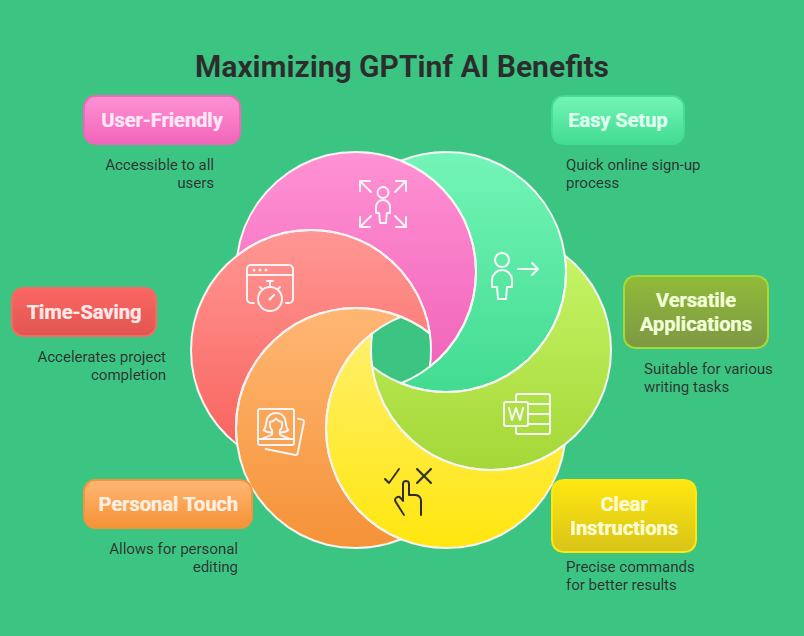
Here’s a quick summary of what you’ll learn in this guide:
- GPTinf AI helps you write fast. It creates text that sounds human for blogs, ads, or ideas.
- Setup is easy. You sign up online and start using it right away.
- It works for many tasks. Use it to write posts, make marketing content, or spark new ideas.
- Clear instructions matter. Tell the AI exactly what you want for better results.
- You still add your touch. Edit the AI’s work to match your style and voice.
- It saves time. Finish projects quicker without starting from scratch.
- Anyone can use it. No tech skills are needed to enjoy its benefits.
This guide gives you all the tools to start using GPTinf AI today. From beginners to pros, there’s something here for everyone. Keep reading to discover how this AI can make your life easier and your work shine!
What Is GPTinf AI?
GPTinf AI is a smart tool that writes text like a human. It comes from the same family as tools like ChatGPT, but it has its own special features. This AI can help you with writing, answering questions, or coming up with ideas. People use it for blogs, emails, social media posts, and more.
The tool learns from lots of text online. That’s why it can create sentences that sound natural. You type what you want, and GPTinf AI gives you a response. It’s fast and simple. Want a 300-word blog post? It can do that. Need a quick idea list? It’s got you covered. Anyone can try it, from writers to students to business owners.
Why Use GPTinf AI?
GPTinf AI makes writing easier and faster. If you spend hours on a blog post, this tool cuts that time down. It gives you a draft to start with, so you don’t face a blank page. Time is precious, and GPTinf AI saves it.
The tool also works for many jobs. You can write a story, create an ad, or plan a project. It fits your needs, no matter what you do. Plus, it’s fun to use! Seeing the AI write for you feels like magic. You don’t need fancy skills either. The simple setup lets anyone jump in and enjoy it.
How to Set Up GPTinf AI
Setting up GPTinf AI takes just a few minutes. First, go to the GPTinf AI website. Look for the sign-up button and click it. You need an email address to make an account. Fill in your details and hit submit.
Next, pick a plan. Some are free, others cost money depending on how much you use it. Choose what fits you best. After that, log in. You’ll see a box to type in and a button to press. That’s it! You’re ready to start asking the AI for help.
How the GPTinf AI Interface Works
The GPTinf AI interface is easy to understand. When you log in, you see a big text box. That’s where you type your request. Below it, there’s a button to send your words to the AI. Click it, and the magic begins.
You can also change some settings. Want a funny tone? Set that. Need a short answer? Adjust the length. It’s all up to you. The layout stays simple, so you focus on creating, not figuring out buttons.
How to Tell GPTinf AI What You Want
GPTinf AI works best when you give clear directions. Tell it exactly what you need. For example, say “Write a 200-word blog post about cats” instead of just “Write about cats.” Details help a lot.
You can also pick the style. Want it friendly? Say “Use a friendly tone.” Need it short? Add “Keep it under 300 words.” The clearer you are, the better it works. Try a few times if the first result isn’t perfect. You’ll get the hang of it fast.
Writing Blog Posts with GPTinf AI
Blogging gets easier with GPTinf AI. Start by picking your topic. Let’s say it’s “healthy snacks.” Type “Write a 300-word blog post about healthy snacks in a casual tone.” Hit the button, and the AI creates a draft.
You get a full post in seconds. Read it carefully. Add your own words or fix parts you don’t like. It’s your blog, so make it sound like you. This method saves time and keeps your ideas flowing.
Finding Ideas with GPTinf AI
Stuck on what to write? GPTinf AI can help. Ask it for ideas. Type “Give me 10 blog topics about travel.” The AI lists them out fast. You pick the best ones and start writing.
It’s great for brainstorming too. Need a story idea? Ask “Suggest 5 story ideas about space.” The AI sparks your creativity. Use it anytime you feel stuck or want something fresh.
Making Marketing Copy with GPTinf AI
GPTinf AI shines for marketing. Need a social media post? Type “Write a short Instagram caption for a new shoe sale.” The AI gives you something catchy. It’s quick and smart.
You can also make email lines or ads. Say “Create a 100-word ad for a coffee shop.” The result grabs attention. Tweak it a bit, and you’ve got marketing gold. Businesses love this for fast, fun content.
Fixing Your Writing with GPTinf AI
GPTinf AI can improve what you already wrote. Got a rough sentence? Type “Rewrite this: I like dogs a lot.” The AI might say, “I really enjoy dogs.” It’s smoother now.
You can also grow short ideas. Give it a line like “Coffee is good,” and ask “Expand this to 100 words.” The AI adds more, making it richer. It’s like having a friend who polishes your work.
Tips to Get Great Results from GPTinf AI
Want the best from GPTinf AI? Try these tips. First, keep trying. If the first answer isn’t right, change your words and ask again. Patience pays off.
Second, check everything. The AI might miss something, so read it all. Third, use it as a helper. You’re the boss, and the AI is your tool. Mix your ideas with its work for awesome results.
Mistakes to Watch Out For
GPTinf AI is great, but avoid these errors. Don’t be vague. Saying “Write something” confuses it. Be clear instead. Don’t expect it to be perfect either. You’ll need to fix small things.
Also, don’t lean on it too much. If you let it do everything, your work loses your voice. Keep control, and use the AI to lift you up, not take over.
How GPTinf AI Stands Out from Other Tools
Lots of AI tools exist, but GPTinf AI is special. It writes text that feels real, not stiff. That’s a big win. It also does many tasks, from blogs to ads, all in one place.
Compared to others, it’s super easy. Some tools have tricky menus, but GPTinf AI keeps it basic. Anyone can use it, and that’s why people pick it over the rest.
Real Examples of GPTinf AI at Work
People use GPTinf AI every day. Bloggers type “Write a post about gardening” and get a draft fast. It saves hours. Marketers ask for ad copy and post it straight to Facebook.
Students use it too. They say “Help me with a 500-word essay on history.” The AI starts it off, and they finish it. These stories show how handy GPTinf AI is.
What’s Next for GPTinf AI
GPTinf AI keeps getting better. Updates bring new tricks, like understanding you more or writing longer pieces. The future looks bright. Soon, it might guess what you want before you ask.
Stay in the loop by checking the website. New features mean new fun, and you’ll want to try them all as they come.
FAQs
What Does GPTinf AI Do?
GPTinf AI writes text that sounds human. You use it for blogs, marketing, or ideas.
How Do I Start Using GPTinf AI?
Go to the website, sign up with your email, pick a plan, and log in.
Can GPTinf AI Write Everything for Me?
No, it helps you write but doesn’t replace you. Edit its work to fit your style.
Does GPTinf AI Cost Money?
Some plans are free, but bigger ones cost. Look online for prices.
How Do I Keep My Content Original?
Check the AI’s text and change it. Add your own words to make it yours.

I’m Liza, the founder and author of Liza AI Blog, where I share my passion for artificial intelligence through insightful guides and updates. I’m dedicated to making AI accessible to everyone, and I strive to create a community that’s both informed and engaged. Through my blog, I aim to promote a deeper understanding and appreciation of AI and its potential to shape our future. You can reach me at lizaaiblog@gmail.com or follow me on social media to stay updated on the latest AI news and trends.