

How to Use Luzia AI: An AI-Powered Assistant on WhatsApp and Telegram
Imagine having a personal assistant that can answer your questions, provide recommendations, transcribe audio, generate images, and more, all through your favorite messaging apps.
That’s what Luzia AI brings to your fingertips. In this friendly guide, we will walk you through how to use Luzia AI to make your life simpler and more fun.
Whether you’re a busy student, a curious professional, or just someone who loves tech, Luzia AI is here to assist you. Keep reading to learn how this amazing AI tool can change the way you use WhatsApp and Telegram.

Key Takeaways
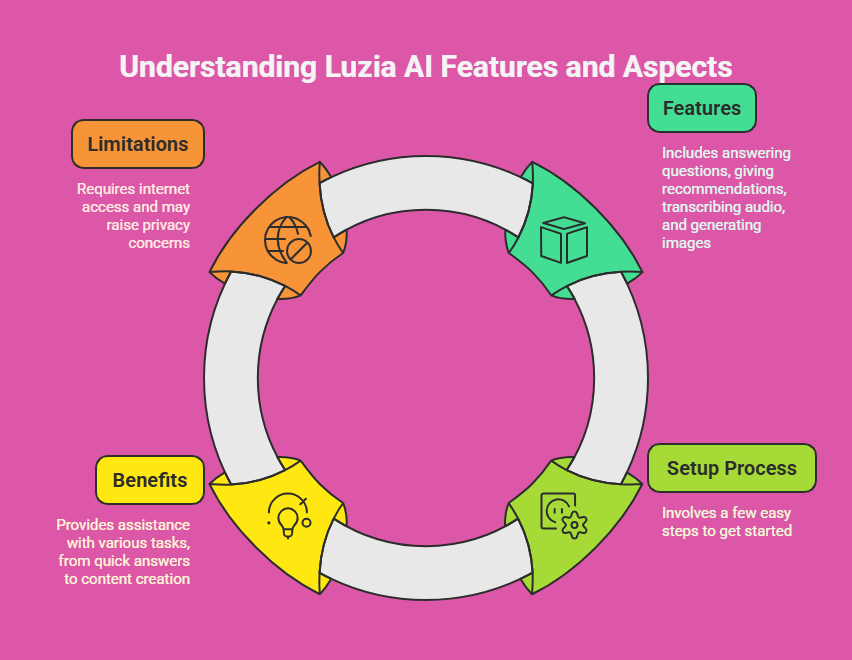
- Luzia AI is an AI-powered assistant that works on WhatsApp and Telegram.
- It comes with many features like answering questions, giving recommendations, transcribing audio, generating images, and more.
- You can set up Luzia AI in just a few easy steps.
- Luzia AI helps with lots of tasks, from quick answers to creating fun content.
- It has great benefits but also some limits, like needing the internet and possible privacy worries.
Luzia AI makes your day easier by handling small tasks and giving you useful info fast. It’s free and works right in your messaging apps, so you don’t need extra tools. You can ask it anything, get news, or even make pictures with a few words.
But it does need a good internet connection, and some people might wonder about their data safety. This guide will show you everything you need to know to start using Luzia AI today.
Introduction to Luzia AI
Luzia AI is a smart assistant that helps you on WhatsApp and Telegram. It uses special technology to understand what you say and reply with helpful answers. You can use it to plan your day, find facts, or just chat for fun.
Luzia AI gets better as you use it, learning what you like to give you better help over time. It’s simple to use, costs nothing, and works for anyone who wants to save time.
This tool is perfect if you want quick answers or help with everyday stuff. It’s like having a friend who knows a lot and is always ready to assist. You don’t need to be a tech expert to enjoy it.
Luzia AI fits right into your messaging apps, so you can start using it without any hassle. Let’s explore what it can do for you.
Features of Luzia AI
Luzia AI has many cool features that make it super useful. Here’s what it can do:
- Answering Questions: It gives fast and correct answers to all kinds of questions.
- Giving Recommendations: It suggests things like places to eat or books to read based on what you like.
- Transcribing Audio: It turns voice messages into text for you to read.
- Generating Images: It creates pictures from words you send it.
- News Updates: It shares the latest news when you ask.
- Language Translation: It changes text into different languages.
These features help you in lots of ways. You can save time and have fun while using it. Whether you need help with school, work, or just want to try something new, Luzia AI is there. It’s a handy tool that does many things right in your chat apps.
Setting Up Luzia AI on WhatsApp
Setting up Luzia AI on WhatsApp is quick and easy. Follow these steps to get going:
- Add the Contact: Go to the Luzia AI website and get their phone number. Save it in your phone.
- Open a Chat: Find Luzia AI in your WhatsApp contacts and send a hello message.
- Follow the Steps: Luzia AI will send you simple instructions to set it up how you like.
- Start Using It: After setup, you can ask it anything or try its features.
That’s it! You’ll be chatting with Luzia AI in no time. It’s so simple that anyone can do it. Once you’re set up, you can enjoy all the cool things Luzia AI offers right in WhatsApp.
Setting Up Luzia AI on Telegram
Getting Luzia AI ready on Telegram is just as simple. Here’s what to do:
- Find the Bot: Open Telegram and search for the Luzia AI bot.
- Start It: Tap on the bot and hit the “Start” button to begin.
- Follow Instructions: Luzia AI will tell you how to set it up your way.
- Use It: After setup, you can start asking questions or trying features.
It takes only a minute to get started. You’ll love how easy it is to use Luzia AI on Telegram. No extra apps needed, just your Telegram account, and you’re good to go.
Using Luzia AI for Answering Questions
Luzia AI is great at answering your questions. It works for simple stuff or harder topics. Here’s how to use it:
- Ask Something: Type or say your question to Luzia AI.
- Get an Answer: Luzia AI will think and send you a clear reply.
- Ask More: If you want more info, just keep asking.
This is super helpful for anyone. Students can get homework help, and adults can find facts fast. It’s like a smart friend who’s always ready to answer. You can use it anytime you’re curious or need info quick.
Using Luzia AI for Recommendations
Luzia AI can suggest things you’ll like. It’s perfect for finding new ideas. Here’s how it works:
- Ask for Ideas: Tell Luzia AI what you want, like “Suggest a fun movie.”
- Get Options: Luzia AI will send you a list of ideas that fit you.
- Learn More: Ask about any suggestion to get extra details.
This feature is awesome for free time. You’ll discover cool stuff without searching hard. Whether it’s food, books, or fun activities, Luzia AI makes picking easy and fun.
Using Luzia AI for Transcribing Audio
Luzia AI can turn voice messages into text. This saves you time when you can’t listen. Here’s how to do it:
- Send the Audio: Forward a voice message to Luzia AI.
- Get the Text: Luzia AI will write out what’s said and send it to you.
- Read It: Check the text whenever you want.
This is great when you’re busy or in a quiet place. It keeps you in the loop without needing to hear the audio. Luzia AI makes voice messages simple to handle.
Using Luzia AI for Generating Images
Luzia AI can make pictures from your words. It’s fun and creative. Here’s how to use it:
- Tell It What You Want: Send a description, like “Draw a dog in a park.”
- See the Picture: Luzia AI will make an image and send it back.
- Change It: If you want something different, just add more details.
This is perfect for creative people. You can make art without drawing a thing. Use it for projects, posts, or just to have fun with your ideas.
Using Luzia AI for News Updates
Luzia AI keeps you updated with news. You don’t need to check websites. Here’s how it works:
- Ask for News: Say something like “What’s new in sports?”
- Get a Summary: Luzia AI will send you a short version of the latest news.
- Dive Deeper: Ask for more if you want the full story.
This keeps you informed fast. You’ll know what’s happening without extra effort. It’s a simple way to stay up to date on what you care about.
Using Luzia AI for Language Translation
Luzia AI can translate text for you. It helps you talk to people in other languages. Here’s how:
- Send the Words: Give Luzia AI the text and say what language you want, like “Translate ‘Hi’ to French.”
- Get the Translation: Luzia AI will send you the translated text.
- Use It: Share it with others or learn from it.
This is awesome for travel or chatting with friends abroad. It breaks down language walls easily. Luzia AI makes talking to anyone simple.
Benefits of Using Luzia AI
Luzia AI has lots of perks that make life better. Here are some big ones:
- Saves Time: It does tasks fast so you don’t have to.
- Easy to Use: Works in your chat apps with no extra steps.
- Fits You: Gives answers and ideas just for you.
- Free: You get all this without paying anything.
- Does Lots: Helps with many things in one place.
These make Luzia AI a must-have. It’s a helper that makes your day smoother. You’ll wonder how you got by without it.
Limitations of Luzia AI
Luzia AI is great, but it has some downsides. Knowing them helps you use it better. Here’s what to watch for:
- Needs Internet: It only works if you’re online.
- Privacy Questions: Your info goes through it, so some worry about safety.
- Not Perfect: It might not handle tricky stuff well.
These limits aren’t deal-breakers. You can still enjoy Luzia AI with a little care. Just keep your internet on and know it’s not for everything.
Frequently Asked Questions
What is Luzia AI?
Luzia AI is a smart assistant for WhatsApp and Telegram. It helps with questions, ideas, audio, pictures, and more.
How do I set up Luzia AI on WhatsApp?
Save Luzia AI’s number from their site. Start a chat on WhatsApp and follow the setup steps it sends.
Can Luzia AI transcribe audio messages?
Yes, it can. Send Luzia AI a voice message, and it will turn it into text for you.
Is Luzia AI free to use?
Yes, it’s free. You can use all its features without spending money.
What are the limitations of Luzia AI?
It needs the internet to work. Some worry about privacy, and it might not do well with hard tasks.

I’m Liza, the founder and author of Liza AI Blog, where I share my passion for artificial intelligence through insightful guides and updates. I’m dedicated to making AI accessible to everyone, and I strive to create a community that’s both informed and engaged. Through my blog, I aim to promote a deeper understanding and appreciation of AI and its potential to shape our future. You can reach me at lizaaiblog@gmail.com or follow me on social media to stay updated on the latest AI news and trends.


