
Tripo 3D AI Review: Revolutionizing Photo Editing with AI Powered 3D Modeling
Have you ever wanted to turn your flat photos into amazing 3D models with just a few clicks? AI technology now makes this possible. Tripo 3D AI is a new tool that changes photo editing forever.
This review shows you how Tripo uses AI to make 3D models from your 2D pictures. It opens up fun and creative options for everyone.
Are you a pro designer, a hobbyist, or just someone who loves tech? This post has all you need to know about Tripo and photo editing. Keep reading to see how this tool can boost your projects.

In a Nutshell
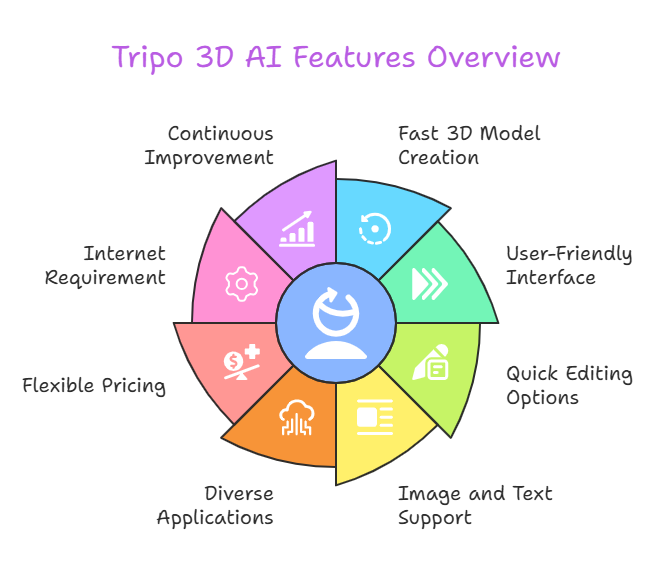
Here are the main points about Tripo 3D AI for photo editing:
- Tripo 3D AI turns photos into 3D models fast. It uses AI to make high quality results.
- The tool has an easy interface. Beginners and pros can use it without trouble.
- It offers quick model creation and editing options. You get support for many file types too.
- Tripo works with both images and text. This makes it stand out from other tools.
- You can use it for many things. Think gaming, design, or teaching.
- Pricing fits different users. There is a free plan for basic needs.
- It has some limits like needing the internet. Still, the good parts outweigh the bad.
- Tripo keeps getting better. A strong community and updates make it even more useful.
This list sums up why Tripo is worth a try. It blends speed, quality, and ease into one package. Whether you edit photos for fun or work, Tripo brings something fresh to your toolkit.
Introduction to Tripo 3D AI
Tripo 3D AI is a platform that uses AI to create 3D models. Traditional 3D software needs lots of skill and time. Tripo changes that. It lets anyone make 3D models from photos or text. This helps photo editing a lot. You can add depth to your pictures easily.
The tool has a simple design. People like graphic designers or game makers find it helpful. Even teachers use it for lessons. Tripo’s AI looks at your photo or words. Then it builds a 3D model fast. This speed is a big deal. You get results in seconds.
Tripo also gives you choices. You can use pictures or type what you want. After that, you can edit the models to fit your needs. It’s flexible and fun. Your imagination sets the limit. Photo editing gets a new twist with Tripo.
How Tripo Transforms Photos into 3D Models
Tripo makes turning photos into 3D models simple. Here is how it works.
First, you upload a photo. Pick a clear, good quality image. The AI needs details to do its job well. Next, the AI studies the photo. It finds shapes, textures, and parts of the image. This step matters a lot. The AI uses this info to build the model.
Then, Tripo creates the 3D model. It happens fast, usually in seconds. You see a 3D version of your photo. After that, you can edit it. Change the shape or fix the textures. You control the final look. Last, you save the model. Tripo lets you pick file types that work with other software.
This process is easy for everyone. You don’t need big skills. Photo editors love it. They turn flat images into 3D pieces fast. It saves time and adds flair to projects.
Key Features for Photo Editing
Tripo has features that make photo editing better. Here are some top ones.
The tool maps textures well. It keeps colors and details from your photo. This keeps models real looking. It also rebuilds shapes from one photo. That beats older methods needing many shots. You can upload lots of photos at once. This batch option saves time for big jobs.
Tripo works with other programs. You can send models to Photoshop or Blender. This helps your workflow. Plus, you see edits as you make them. The live preview lets you tweak things fast.
These features help photo editors a ton. You make 3D models quickly. Even new users get good results. It’s a big win for creativity. Tripo makes 3D editing simple and strong.
User Experience and Interface
Tripo’s interface is easy to use. You log in and see a clear dashboard. It shows you how to start. You can upload photos or type text. This setup is friendly.
Moving around is simple. Buttons and menus guide you. You drag and drop photos to upload. The AI works fast. Then you see your 3D model. Editing happens in the same place. No switching screens needed.
New users get tips and guides. These help you learn quick. There’s a community too. You find help or ideas there. Tripo makes things smooth. Pros and beginners both enjoy it.
Quality of 3D Models from Photos
Tripo makes great 3D models from photos. The quality impresses most users. It grabs details like textures and colors well. This makes models look alive.
I tried it with different photos. A car picture turned into a 3D model with shiny parts. A face photo kept the person’s look right. The results feel pro. Sometimes small flaws show up. No tool is perfect. But Tripo does solid work.
Your photo quality matters. Clear, bright shots give the best models. Even okay photos turn out decent. Photo editors can trust this. You get models good enough for real projects.
Editing Capabilities in Tripo
Tripo lets you edit 3D models easily. The tools are simple to use. Anyone can try them.
You can change the model’s shape. Move points or edges to fix it. You also edit textures. Add colors or patterns you like. This gives you control. Lighting options are there too. Set the light to make it pop. For moving models, basic animation tools help.
The live preview shows changes fast. You see what you do right away. It’s handy for quick fixes. These tools fit photo editing needs. They may not do everything big software does. Still, they work great for most jobs.
Comparison with Other Photo to 3D Tools
Other tools turn photos into 3D models too. Spline, Womp, and echo3D are some. Tripo shines in key ways.
It’s super fast. Models come in seconds. Other tools take longer. Speed helps pros a lot. Tripo’s AI makes accurate models too. Details stay sharp. Some tools match this, but Tripo stays steady.
The interface is easy. Other options can feel hard for newbies. Tripo welcomes all. It has a free plan too. Many tools ask for money up front. Your needs matter though. For most photo editing, Tripo wins on speed and ease.
Use Cases in Photo Editing
Tripo fits many photo editing jobs. Here are some ways to use it.
You can show products in 3D. Make models for ads or online stores. For buildings, turn photos into 3D views. Clients love this. Characters from photos become 3D for games or art. Teachers use it too. Old photos turn into models for lessons.
Artists mix photos and 3D for cool work. It’s a creative boost. Picture a car on a magazine cover. Tripo makes it 3D and movable. For houses, you give clients a 3D tour. No big skills needed. Tripo opens new doors.
Pricing and Plans
Tripo has plans for all users. The free one gives you 10 models a month. It’s great to start. The pro plan costs 29.90 dollars monthly. You get 100 models and fast help. The premium plan is 199 dollars. It offers 1000 models for big users.
All plans let you use main features. You make models from photos or text. Free is a good test. Prices beat many tools out there. For photo editors, a paid plan pays off fast with time saved.
Pros and Cons
Tripo has good and bad points. Here’s the list.
Pros:
- Speed is fast. Models take seconds.
- Quality is high. Details look good.
- It’s easy. Anyone can use it.
- It’s flexible. Use photos or text.
- Free option exists. Try it with no cost.
- Help is there. Community and team support you.
Cons:
- Needs internet. No connection, no work.
- Models can glitch. Small errors happen.
- Some tools take learning. Advanced stuff isn’t instant.
- Uses power. Old devices may slow down.
Tripo’s good sides make it strong. It’s worth a shot.
Tips for Best Results with Photos
Want great models from Tripo? Try these tips.
Use clear photos. High quality shots work best. Keep backgrounds plain. This helps the AI focus. Don’t use dark or bright messed up images. Good light keeps details right.
Try different photo angles. See what works. Edit the models after. Fix them your way. Check file types. Make sure they fit your software. These steps make your 3D models top notch.
Community and Support
Tripo has a lively community. Users share tips and models. You find them on Discord or forums. It’s a big help.
The support team answers fast. They fix problems or take ideas. Newbies and pros get aid. Tripo updates often. User thoughts shape it. This keeps the tool strong.
Future Developments
Tripo plans to grow. The team works on new stuff. Here’s what might come.
The AI could get sharper. Models might gain more detail. Editing tools may expand. You’d get more power. It could link better with other programs. A phone app might pop up. Community sharing could grow too.
These updates keep Tripo ahead. Photo editors will love it more.
FAQs
What is Tripo 3D AI?
Tripo 3D AI uses AI to make 3D models from photos or text. It’s easy and fast.
How does Tripo convert photos to 3D models?
Tripo’s AI looks at your photo. It builds a 3D model from what it sees.
Is Tripo free to use?
Yes. Tripo has a free plan. You get 10 models a month. Paid plans give more.
What file formats does Tripo support?
Tripo saves models as OBJ or STL. These work with many programs.
Can I edit the 3D models generated by Tripo?
Yes. Tripo has tools to change your models after they’re made.
Is Tripo suitable for professional photo editing?
Yes. Tripo makes good models. Pros find it useful.
Does Tripo require a powerful computer?
Tripo runs fine. But good models need decent power and internet.
How can I get support if I encounter issues?
Tripo offers help on forums and Discord. The team answers too.

I’m Liza, the founder and author of Liza AI Blog, where I share my passion for artificial intelligence through insightful guides and updates. I’m dedicated to making AI accessible to everyone, and I strive to create a community that’s both informed and engaged. Through my blog, I aim to promote a deeper understanding and appreciation of AI and its potential to shape our future. You can reach me at lizaaiblog@gmail.com or follow me on social media to stay updated on the latest AI news and trends.