Stickerble AI Review: Is This the Ultimate Sticker Creation Tool?
Are you ready to dive into something fun and creative? Today, I’m sharing my thoughts on Stickerble AI, a tool that promises to make sticker creation easy and exciting. Imagine turning your ideas into cool stickers with just a few clicks.
Sounds awesome, right? this Stickerble AI review, I’ll walk you through what it is, how it works, and whether it’s worth your time. I’ve spent hours playing with it, so you’ll get the full scoop.
Stick around because this could be the game changer you’ve been looking for in your creative projects!
Key Takeaways:
Here’s a quick list of what you’ll learn from this Stickerble AI review. I’ve packed it with the juicy details to save you time and get you excited.
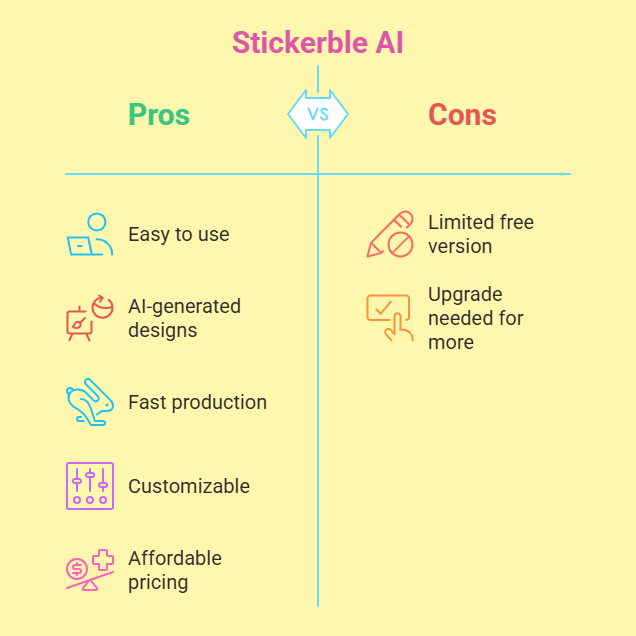
- Stickerble AI is simple to use. You don’t need design skills to create stickers. The platform does most of the work for you.
- AI powers the creativity. It generates unique sticker designs based on your input. This saves you hours of brainstorming.
- It’s fast and efficient. You can make print-ready stickers in minutes. Perfect for quick projects or last-minute ideas.
- Customization is a big win. You can tweak colors, shapes, and sizes to match your style. It gives you control over the final look.
- Pricing fits different budgets. Plans range from free to premium. There’s something for everyone, whether you’re testing it out or going all in.
- Quality stands out. The stickers look sharp and professional. They’re great for personal use or selling online.
- Some limits exist. The free version has fewer features. You might need to upgrade for more options.
This list sums up the big points. Now, let’s dig deeper into each part of Stickerble AI. Ready? Let’s go!
What Is Stickerble AI?
Stickerble AI is an online tool that uses artificial intelligence to create stickers. You type in a few words or ideas, and it generates designs for you. I first heard about it from a friend who runs an Etsy shop. She said it cut her design time in half. Naturally, I had to try it myself.
The tool aims to make sticker creation fun and fast. It’s built for people who want custom stickers without spending hours on software like Photoshop. You don’t need to be an artist. The AI handles the heavy lifting. All you do is give it a starting point, like “cute cat” or “retro car,” and watch it work its magic.
I love how it simplifies the process. You get high-quality, print-ready files in no time. It’s a mix of technology and creativity that feels fresh. Plus, it’s web-based, so you don’t need to download anything. Just log in and start creating!
How Does Stickerble AI Work?
Stickerble AI keeps things simple. You begin by signing up on their website. After that, you enter a keyword or phrase in the text box. For example, I typed “funny dog” to see what it could do. The AI then generates several sticker designs based on your input.
Next, you pick the one you like best. From from there, you can adjust it. Change the colors. Resize it. Add text if you want. I spent about 10 minutes tweaking a design, and it felt effortlesssuper easy. The interface is clean and straightforward, so you won’t get lost.
Once you’re happy, you download the file. It’s ready to print or share online. The whole process took me less than 20 minutes. I was impressed by how quick and smooth it was. The AI does the hard part, and you add your personal touch.
What Are the Main Features of Stickerble AI?
Stickerble AI comes with some cool features. First, it has an AI design generator. You give it a prompt, and it creates multiple options. I tried “space adventure,” and it gave me five unique designs. Each one was bold and eye-catching.
Another feature is the customization tool. You can edit every part of the sticker. I changed a rocket’s color from blue to red in seconds. It’s flexible and fun to play with. There’s also a library of templates. These are pre-made designs you can tweak. I found a floral pattern I loved and made it my own.
The tool offers high-resolution downloads. This means your stickers look crisp, whether you print them small or large. Lastly, it has a preview mode. You see how your sticker looks on different surfaces, like a laptop or water bottle. It’s a small detail, but it helps you visualize the final product.
Who Can Use Stickerble AI?
Stickerble AI works for lots of people. Artists use it to create unique designs fast. I know a painter who makes stickers to sell at craft fairs. She says it’s a time-saver. Small business owners love it too. A friend with a bakery uses it for branded packaging stickers.
Hobbyists enjoy it as well. My cousin makes stickers for her scrapbook. She’s not a pro, but she gets pro-level results. Even teachers can use it. One I spoke to designs classroom rewards with it. The tool fits beginners and experts alike.
You don’t need experience to start. The learning curve is gentle. If you can type and click, you’re good to go. It’s a tool that grows with you as you get more creative.
What Are the Benefits of Stickerble AI?
Stickerble AI has some big wins. Speed is a huge one. I made three stickers in under an hour. That’s way faster than designing from scratch. It also saves effort. The AI gives you a head start, so you’re not staring at a blank page.
Creativity flows easier. Sometimes I struggle with ideas. Stickerble AI sparks inspiration with its suggestions. The quality is another perk. The designs are sharp and polished. I printed some on glossy paper, and they looked amazing.
It’s also affordable. You get a lot for the price, especially compared to hiring a designer. Plus, it’s fun! I smiled the whole time I used it. It feels like a creative playground with practical results.
How Much Does Stickerble AI Cost?
Stickerble AI offers a few pricing plans. There’s a free version to start. You get basic features and a handful of downloads. I tested it first, and it’s great for trying things out. No credit card needed, which I appreciate.
The premium plan costs around $10 a month. You unlock more designs, higher resolution, and extra tools. I upgraded after a week because I wanted more options. They also have a pro plan at $25 a month. It’s for heavy users, like businesses needing bulk downloads.
Occasional discounts pop up too. I snagged a deal during a holiday sale. Check their site for the latest prices. It’s flexible, so you can pick what fits your wallet.
What Are the Downsides of Stickerble AI?
No tool is perfect, and Stickerble AI has some drawbacks. The free version feels limited. You only get a few designs per prompt. I wanted more variety without paying. Also, the AI can miss the mark. I typed “vintage bike,” and one design was too modern.
Customization has limits. You can’t change every tiny detail. I tried to adjust a font size once, but the option wasn’t there. Internet speed matters too. My connection lagged once, and the generator slowed down.
It’s not a dealbreaker, but it’s worth knowing. You might need a backup plan for super specific ideas. Still, the pros outweigh the cons for me.
How Does Stickerble AI Compare to Other Tools?
I’ve tried a few sticker tools, so let’s compare. Canva is popular. It’s versatile but not AI-focused. You design everything yourself, which takes longer. Stickerble AI is faster because the AI starts it for you.
Then there’s Redbubble’s sticker maker. It’s tied to their shop, so it’s less flexible. Stickerble AI lets you use designs anywhere. Cricut Design Space is another. It’s great for cutting machines, but it’s not AI-driven. Stickerble wins on speed and ease.
Each tool has its strengths. Stickerble AI stands out for quick, AI-powered results. If you want total control, Canva might edge it out. For me, Stickerble’s balance of speed and creativity wins.
Is Stickerble AI Easy to Use?
Stickerble AI keeps it simple. The website loads fast. You sign up with an email, and you’re in. The dashboard shows clear options: “Create,” “Edit,” “Download.” I clicked “Create” and typed my idea. Boom, designs appeared.
The editing tools are drag-and-drop. I moved a star on a sticker without a hitch. Everything has labels, so you won’t guess what’s what. I showed it to my mom, who’s not techy. She made a flower sticker in 15 minutes.
Tutorials pop up if you need help. I didn’t, but they’re there. It’s beginner-friendly and smooth for pros too. You’ll feel comfy fast.
What Do Users Say About Stickerble AI?
People like Stickerble AI. On forums, users praise the speed. One Etsy seller said she made 10 stickers in a day. Another loved the quality. He printed a batch and got compliments at a market.
Some mention downsides. A few said the AI designs can feel generic. One user wished for more font choices. But most reviews glow. A teacher called it her “go-to for class projects.” The vibe online is positive.
I agree with the buzz. It’s not flawless, but it delivers. User feedback matches my experience: fast, fun, and worth a shot.
Can Stickerble AI Boost Your Business?
Stickerble AI can help businesses grow. If you sell online, custom stickers add flair. I know a coffee shop owner who used it for bag labels. Customers noticed and sales ticked up.
It’s great for branding. You make logos or slogans into stickers fast. A friend with a candle shop sticks them on jars. It’s cheap marketing. Plus, you can test ideas without big costs. I made a few designs for a side hustle, and they sold out.
Time savings matter too. You focus on selling, not designing. It’s a small tool with big potential for entrepreneurs.
How to Get Started with Stickerble AI?
Getting going is easy. Visit the Stickerble AI website. Click “Sign Up.” Use your email or Google account. I picked email and was in within a minute.
Next, pick a plan. Start free to test it. I did, then upgraded later. Once you’re in, click “Create New.” Type your idea, like “beach vibes.” Hit generate. You’ll see designs pop up.
Pick one and edit it. Download when you’re done. I made my first sticker in 10 minutes. Play around and have fun. You’ll get the hang of it quick!
Does Stickerble AI Offer Support?
Stickerble AI has solid support. There’s an email option on their site. I sent a question about file formats and got a reply in a day. It was clear and helpful.
They also have a FAQ page. It covers basics like “How do I download?” I checked it first and found answers fast. No live chat, though. That’d be nice for instant help.
For a small tool, the support works. You won’t feel stuck. I sorted out my issues without stress.
Is Stickerble AI Worth It?
So, is Stickerble AI worth your time? I say yes. It’s fast, fun, and affordable. I made stickers I’m proud of without breaking a sweat. The AI saves hours, and the quality holds up.
It’s not perfect. The free plan limits you, and customization could go deeper. But for the price and ease, it’s a steal. I’ve used it for gifts, projects, and even sold a few designs.
If you love creating or need stickers quick, give it a whirl. It’s a tool that delivers more than it costs. I’m hooked!
FAQs
What Is Stickerble AI Used For?
Stickerble AI helps you create custom stickers. You type an idea, and it generates designs. You can use them for fun, gifts, or business branding.
Is Stickerble AI Free?
Yes, it has a free plan. You get basic features and a few downloads. Premium plans unlock more options for a small fee.
Can Beginners Use Stickerble AI?
Absolutely! It’s simple and clear. You don’t need design skills. Just type and click to start.
How Fast Is Stickerble AI?
It’s super quick. I made a sticker in under 20 minutes. The AI generates designs in seconds, and editing is fast.
Does Stickerble AI Work Offline?
No, it’s online only. You need an internet connection to use it. That’s the only catch I found.

I’m Liza, the founder and author of Liza AI Blog, where I share my passion for artificial intelligence through insightful guides and updates. I’m dedicated to making AI accessible to everyone, and I strive to create a community that’s both informed and engaged. Through my blog, I aim to promote a deeper understanding and appreciation of AI and its potential to shape our future. You can reach me at lizaaiblog@gmail.com or follow me on social media to stay updated on the latest AI news and trends.